For years, the MacBook felt like the calm machine in a noisy laptop store. Fast, cool, quiet, and hard to embarrass. Qualcomm Snapdragon X Elite changes that conversation for buyers who want MacBook-like battery life without leaving Windows. The best way to read this battle is not “Mac lost” or “Windows won.” That is too lazy. The real shift is that a U.S. buyer can now walk into Best Buy, compare a Surface Laptop, Dell XPS 13, Lenovo Yoga, or HP model against a MacBook Air, and see a serious fight on speed, unplugged use, AI features, and price. Qualcomm’s chip uses a 12-core Oryon CPU and a 45 TOPS Hexagon NPU, while Microsoft’s Copilot+ PC guidance calls for 40+ TOPS for many local AI features. For readers tracking laptop trends, smarter tech coverage for digital publishers now has a richer story to follow than another thin “Mac versus PC” argument.
The Fight Is No Longer About Peak Speed Alone
A laptop chip used to be judged like a drag race. Open the benchmark chart, find the bigger number, declare a winner, and move on. That made sense when most laptops were loud, hot, and plugged in half the day. It makes less sense now. The modern fight is about how a machine feels across a whole workday.
That is where Qualcomm’s Windows push gets interesting. Apple Silicon laptops still have a strong lead in polish, app depth, and proven trust. Yet the new Windows ARM machines are finally close enough to make the comparison useful for normal buyers, not only chip nerds.
Why unplugged performance matters more than a lab score
A benchmark run lasts minutes. Your laptop day lasts hours. The harder test is a messy Tuesday: Chrome tabs, Google Docs, Slack, Zoom, Spotify, PDFs, and a few photos waiting to be edited before dinner.
That is the kind of load where ARM laptop performance starts to matter. You are not asking the chip to win one sprint. You are asking it to stay steady without burning battery like a gaming laptop. That is the old MacBook advantage, and Qualcomm is trying to bring that feeling to Windows.
The non-obvious part is that most people do not need the fastest chip. They need the least annoying one. A laptop that wakes fast, stays cool on a couch, and does not make the fan scream during a video call feels faster than a machine with a higher peak score and worse habits.
Why Apple still owns the trust advantage
Apple did not win the last few years only because its chips were quick. It won because the whole machine worked as one piece. macOS, battery tuning, trackpads, displays, sleep behavior, video engines, and app support all moved in the same direction.
That matters. A MacBook Air with Apple’s M4 chip has a 10-core CPU option, up to a 10-core GPU, and a 16-core Neural Engine, based on Apple’s own technical listing. Those numbers are part of the story, but the bigger reason people trust the Air is simpler: it does not ask buyers to think much.
Windows has more hardware choice, which is both its power and its headache. A Samsung, Lenovo, Dell, HP, or Surface laptop can all use similar silicon and still feel different. Keyboard feel, screen type, cooling, firmware, speakers, and price can change the whole result. That is why the chip can challenge Apple, while the laptop around it still has to earn the sale.
Where Snapdragon X Elite Laptop Chip Performance Changes the Windows Buyer’s Choice
The big change is not that every Windows laptop suddenly beats every MacBook. It does not. The change is that a thin Windows machine can now enter the same mental shelf as a MacBook Air for many U.S. buyers. That shelf used to be reserved for quiet battery life, strong everyday speed, and light travel.
For students, remote workers, real estate agents, consultants, and small business owners, this is a practical shift. They can keep Windows apps, Office habits, familiar file handling, and broad device support without giving up the whole-day laptop dream.
The Surface and XPS examples show the real target
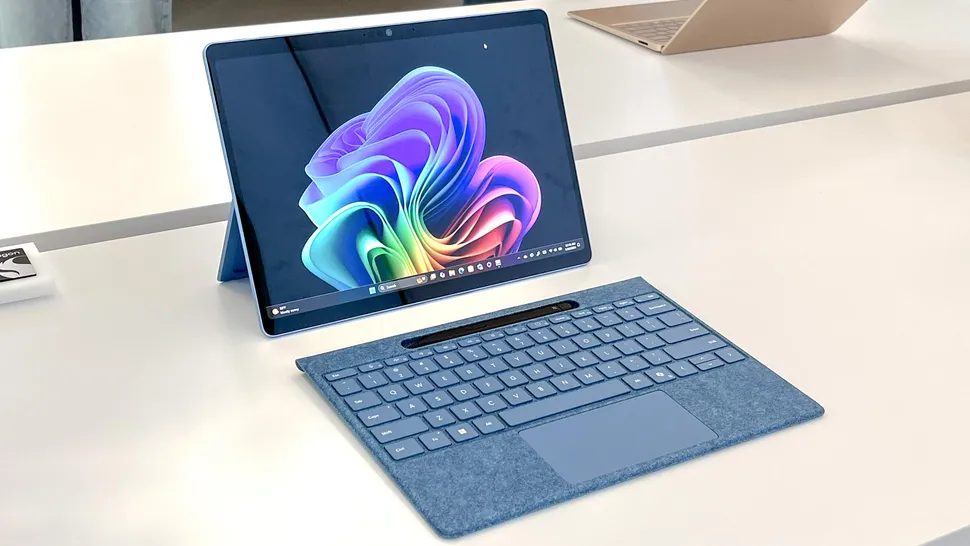
Microsoft’s Surface Pro for Business page lists Snapdragon options with 16 GB or 32 GB memory, removable SSD choices, optional OLED, Wi-Fi 7, and a 45 TOPS NPU. That kind of spec sheet tells you where the market is going. These are not toy machines made only for email.
The Dell XPS 13 is another useful example because it aims straight at the MacBook Air buyer. Thin body. Premium screen. Minimal design. Long battery life. A machine like that does not need to beat a MacBook in every task. It needs to make a Windows buyer stop feeling punished for staying on Windows.
Here is the quiet truth: Apple does not need to lose for Qualcomm to win ground. If Windows laptops become good enough in the exact areas where MacBooks felt untouchable, the buying decision becomes personal again.
The AI pitch helps, but it cannot carry the whole laptop
The NPU story sounds exciting on paper. Local AI can improve privacy, reduce cloud dependence, and make features feel faster when software supports them. Microsoft’s Copilot+ PC class was built around this idea, with a 40+ TOPS NPU requirement for many new Windows AI features.
Still, buyers should stay calm. A laptop is not good because it has an AI badge. It is good because it handles your daily work without friction. If local captions, camera effects, search, or creative tools save time, great. If not, the chip still needs to prove itself through battery life, app behavior, and comfort.
That is the counterintuitive part. The AI hardware may get the headlines, but the old laptop basics will decide the sale. Nobody forgives a weak keyboard because the NPU has a big number.
The Software Gap Is Smaller, But It Still Matters
Hardware can move fast. Software moves with people, companies, habits, plug-ins, and old code. That is why Windows on ARM has always had a hard road. The chip can be ready before the buyer’s workflow is ready.
Things are better now. Native ARM apps have improved, emulation has become more useful, and major daily tools run well for many users. Yet “many users” is not the same as everyone. That gap is where buyers need to be honest before spending money.
Everyday apps are the easiest win
A huge number of Americans live inside a browser. Gmail, Google Docs, WordPress, Shopify, Canva, YouTube Studio, QuickBooks Online, banking portals, school dashboards, and social scheduling tools do not care much about the old Windows chip divide.
For those users, Windows on ARM can feel natural. The laptop wakes, the browser opens, the tabs run, and the day moves. A student at Arizona State writing papers and joining Zoom classes may never hit the rough edge. A local insurance agent using web tools, PDFs, Office, and Teams may see battery gains with no drama.
This is where Apple Silicon laptops face a new kind of pressure. Apple still offers the cleaner platform, but Windows now has a better answer for people whose work lives in web apps and Microsoft tools.
Games, drivers, and older tools remain the danger zone
The warning label belongs to people with special software. Some games still dislike ARM systems, especially titles with certain anti-cheat tools. Some older drivers, VPN clients, printer tools, audio software, engineering apps, or niche business programs may behave poorly or not run at all.
The Verge noted that Qualcomm’s chips made Windows on ARM far more viable, while app compatibility and gaming still remained limits; it also pointed to later progress in emulation and support for more creative apps and some games. That is the fair middle. Better does not mean solved.
A buyer should make a list before purchase: the five apps that cannot fail. Not the apps used once a month. The daily ones. If those are browser-based, Microsoft-native, or confirmed ARM-friendly, the risk drops. If they include old industry tools or heavy gaming, a traditional x86 laptop or Mac may still be safer.
Apple Silicon Is Being Challenged From the Side, Not the Front
Apple’s strength is not one chip generation. It is the whole stack. That is why the smartest Windows attack is not to copy MacBooks point for point. It is to win the buyers Apple leaves half-served.
Some people admire MacBooks but do not want macOS. Some need Windows-only tools. Some want touchscreens, OLED panels, 2-in-1 forms, repair options, or more vendor choice. Qualcomm’s best opening is in those gaps.
Windows has variety Apple rarely offers
Walk through a U.S. electronics store and the difference is clear. Apple sells a tight set of laptops. Windows gives you clamshells, foldables, convertibles, detachable tablets, OLED screens, matte screens, business ports, cellular options, and many price points.
That variety has often come with uneven battery life and noisy heat. If ARM chips reduce that tradeoff, Windows becomes more dangerous to Apple. A Surface Pro with a keyboard is not a MacBook Air clone. A Lenovo Yoga is not trying to be a Mac. That is the point.
The non-obvious insight is that Qualcomm does not need to beat Apple at being Apple. It needs to let Windows machines keep their own shapes without paying the old battery penalty.
Apple’s media and app edge still matters for creators
Creative buyers should be careful. Apple’s media engines, Final Cut support, Logic Pro, ProRes handling, and long developer focus give Macs a strong base for video, music, and design work. Apple’s M4 Pro and M4 Max systems also push far beyond the MacBook Air class, with Apple listing M4 Pro options up to a 14-core CPU and 20-core GPU.
That does not make Windows ARM weak. It means the comparison must match the job. A blogger editing images, writing posts, and cutting short clips may be fine on a new ARM Windows laptop. A film editor with plug-ins, color tools, external capture gear, and team workflows should test before switching.
The same advice applies to buyers comparing MacBook alternatives for work travel or Windows laptop buying tips for students. The right answer is not brand loyalty. It is workflow fit.
Conclusion
The old laptop debate was too simple. MacBooks were efficient, Windows laptops were flexible, and buyers had to pick which compromise hurt less. That line is fading. Qualcomm Snapdragon X Elite gives Windows machines a real chance to fight where Apple has been strongest: quiet speed, long unplugged use, and modern AI hardware. It does not erase Apple’s lead in polish, creative workflows, or platform trust. It does make the Windows side credible again.
For U.S. buyers, the best move is practical. Check the exact laptop model, not only the chip name. Confirm your must-have apps. Look at keyboard feel, screen quality, return policy, and battery tests from real reviewers. A chip can open the door, but the full machine has to live on your desk, in your backpack, and beside your coffee. Choose the laptop that makes your normal day feel easier.
Frequently Asked Questions
Is a Snapdragon Windows laptop better than a MacBook Air?
It can be better for buyers who need Windows, touch options, or certain business tools. A MacBook Air still has stronger platform polish and broad creative app confidence. The better pick depends on your daily software, not only chip speed.
Does Windows on ARM run normal Windows apps?
Many common apps run well, especially browsers, Microsoft apps, and newer native ARM versions. Some older programs depend on emulation. Specialized tools, drivers, VPN clients, and games should be checked before buying.
Is the battery life close to Apple Silicon laptops?
Many new ARM Windows laptops are close enough for normal buyers to compare them with MacBooks. Exact results depend on screen type, laptop size, brightness, cooling, and workload. OLED models may use more power than basic LCD versions.
Are Snapdragon laptops good for college students?
They can be a strong fit for students using browsers, Microsoft Office, Zoom, PDFs, research tools, and online learning platforms. Students in engineering, gaming, music production, or design programs should confirm required software support first.
Can these laptops handle video editing?
Light editing, social clips, and basic creator work can be fine on supported apps. Heavy timelines, plug-ins, codecs, and external hardware may favor MacBook Pro models or x86 Windows workstations. Test the exact app before relying on it.
What does the NPU do in a laptop?
The NPU handles certain AI tasks locally, which can help with camera effects, captions, image tools, search, and future software features. It is not a magic speed boost for every app. Its value grows when apps are built to use it.
Should gamers buy a Windows ARM laptop?
Most gamers should be cautious. Some games work, but compatibility can be uneven, and anti-cheat systems may block certain titles. A traditional gaming laptop with an x86 chip and dedicated graphics is still the safer gaming choice.
How should I choose between Mac and Windows ARM?
Start with your must-have apps, then check battery life, display, keyboard, ports, and price. Pick Mac if you want the cleanest platform and strong creative support. Pick Windows ARM if you need Windows with better mobility than older thin PCs.